The contemporary cybersecurity landscape for Small and Medium-sized Businesses (SMBs) is defined by a paradox of access and vulnerability. While SMBs now have access to enterprise-grade tools via the cloud, they are simultaneously subject to enterprise-grade threats, yet they often lack the enterprise-grade resources to combat them. For the past two decades, the prevailing orthodoxy in information security operations has been the “cycle of reactivity”: identify a vulnerability, wait for a vendor patch, and apply the patch. This model, often summarised as “cyber hygiene,” assumes a static environment where vendors are responsive, systems are supportable, and downtime is negotiable. However, the velocity of vulnerability disclosure (compounded by the persistence of legacy infrastructure, unpatchable operational technology (OT), and the rapid expansion of the attack surface through shadow IT) has rendered the “patch-everything” strategy not only untenable but dangerous.
The “patch-it” mentality operates on the premise that the vulnerability is the root cause of the risk. A deeper analysis reveals that the vulnerability is merely a symptom; the root cause is the presence of the hazardous asset itself. When an SMB’s IT team spends its weekends frantically patching a legacy File Transfer Protocol (FTP) server to prevent a critical exploit, they are engaging in a battle of attrition they are statistically destined to lose. The sheer volume of Common Vulnerabilities and Exposures (CVEs) creates a noise-to-signal ratio that overwhelms small teams. Furthermore, the reliance on patching ignores the “zero-day” reality: the window of exposure often opens before the patch exists.
To escape this cycle, cybersecurity leadership must look outside the digital domain to the established principles of industrial safety. The National Institute for Occupational Safety and Health (NIOSH) and the Occupational Safety and Health Administration (OSHA) have spent decades refining the Hierarchy of Controls, a framework designed to protect workers from physical hazards such as chemical fumes, dangerously loud machinery, and working at heights. This hierarchy posits a fundamental truth: preventing exposure to a hazard is infinitely superior to protecting the worker while they interact with it.
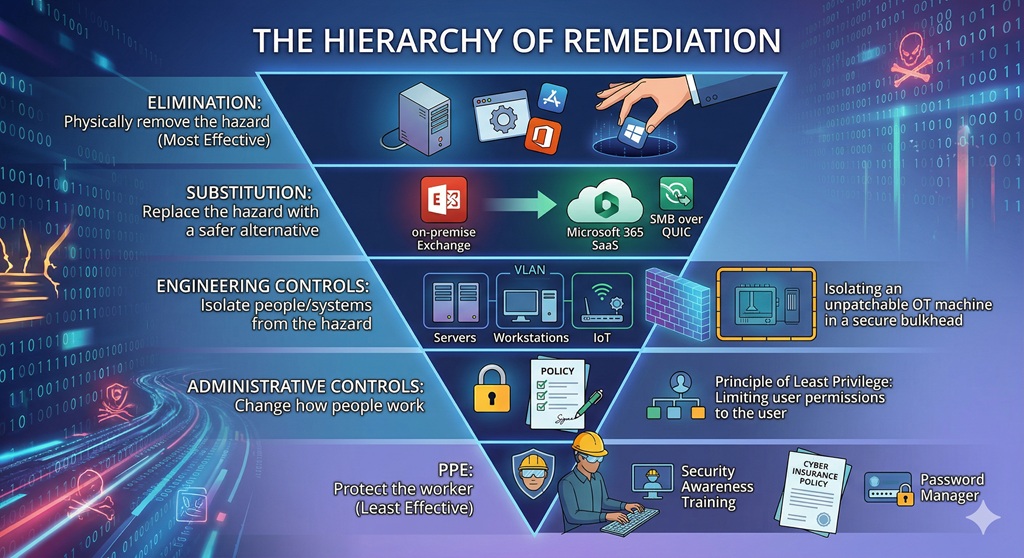
By transposing this industrial safety framework onto the digital domain, organisations can move beyond the “whac-a-mole” approach of vulnerability management. The Hierarchy of Remediation prioritises controls based on effectiveness and reliability, structured as an inverted pyramid:
- Elimination: Physically removing the hazard (the most effective).
- Substitution: Replacing the hazard with a safer alternative.
- Engineering Controls: Isolating people and systems from the hazard.
- Administrative Controls: Changing how people work.
- Personal Protective Equipment (PPE): Protecting the worker with gear (the least effective)
This research provides an exhaustive analysis of each level of the hierarchy, specifically tailored to the resource constraints and operational realities of SMBs. It explores strategies for handling “unpatchable” scenarios (such as end-of-life (EOL) operating systems or critical IoT devices) by applying compensatory controls from the lower levels of the hierarchy. Furthermore, it details the governance structures required to manage this shift, including risk acceptance workflows and the maintenance of dynamic risk registers.
The Theoretical Basis: Prevention through Design (PtD)
The Hierarchy of Controls is closely linked to the concept of Prevention through Design (PtD). In the context of occupational health, PtD anticipates and “designs out” hazards in tools, equipment, and work processes. In cybersecurity, this translates to designing IT architectures where hazards are removed before they enter the operational phase.
Consider the hazard of “silica dust” in a construction setting versus “malicious email attachments” in an office setting.
- The PPE Approach: In construction, this involves giving the worker a respirator. In cyber, this involves giving the employee “security awareness training” to recognise phishing. Both rely on human compliance and fail if the worker is tired, distracted, or the equipment (mask or training) is faulty.
- The Engineering Approach: In construction, this means using a vacuum system to capture dust at the source. In cyber, this means using an email gateway to strip attachments before they reach the inbox.
- The Elimination Approach: In construction, this means using a material that does not contain silica. In cyber, this means eliminating the use of email for file transfer entirely, forcing users to use a secure, scanned portal.
The NIOSH framework emphasises that the controls at the top of the hierarchy (Elimination, Substitution) are more effective because they control exposures without significant human interaction. They are “fail-safe” rather than “fail-secure.” If a user forgets their training (PPE), they are compromised. If the hazardous system has been decommissioned (Elimination), the user cannot be compromised by it, regardless of their behaviour.
The Economic Imperative for SMBs
A common critique of high-level controls like Elimination and Substitution is that they are capital-intensive. Replacing a legacy on-premise Exchange server with Microsoft 365 (Substitution) requires migration costs, licensing fees, and retraining. However, this view suffers from “short-termism.”
The cost of maintaining a hazard (Administrative + PPE) is infinite over time. An organisation keeping a legacy server must pay for:
- Continuous patching cycles (Labour).
- Intrusion Prevention Systems (Engineering licensing).
- Extended Support updates (Vendor fees).
- Cyber Insurance premiums (PPE costs).
- Potential breach remediation (Risk cost).
In contrast, Elimination is a one-time cost that permanently removes the recurring operational expenditures associated with that hazard. For the SMB, which lacks the economy of scale to maintain a 24/7 Security Operations Center (SOC), moving up the hierarchy is the only way to achieve sustainable security. It reduces the “Attack Surface” (the aggregate of all potential entry points) making the remaining environment manageable for a small team.
Level 1: Elimination – The Gold Standard of Remediation
Definition: Elimination is the physical removal of the hazard from the workplace. In the cybersecurity domain, this equates to the decommissioning of software, hardware, services, or data that introduce risk. It is the only control that offers 100% effectiveness; a vulnerability cannot be exploited if the code containing it no longer exists on the network.
The Philosophy of Reduction: Attack Surface Management
The modern SMB network is often a museum of “technical debt.” Servers deployed for projects three years ago remain active but unused. Software installed for a specific client requirement lingers on endpoints long after the client has churned. This accumulation of digital detritus creates a massive, unmonitored attack surface.
Elimination strategies focus on Attack Surface Reduction (ASR). The goal is to prune the IT environment down to the absolute minimum viable set of assets required to conduct business. By eliminating the extraneous, the organisation eliminates the maintenance burden and the risk associated with those assets.
Application Rationalisation: The Strategic Purge
Application Rationalisation is the systematic process of identifying all software applications within an organisation to determine which should be kept, replaced, retired, or consolidated. Research suggests that organisations waste millions annually on unused software, with a significant percentage of provisioned licenses never being used. More critically, “shadow IT” (applications purchased by departments without IT oversight) often harbors high-risk vulnerabilities because they fall outside the standard patching cadence.
The Rationalisation Workflow for SMBs
Implementing Application Rationalisation in an SMB environment requires a structured approach to overcome the natural hoarding instinct of business units.
Step 1: Discovery and Inventory An SMB cannot eliminate what it cannot see. The first step is comprehensive discovery using automated scanning tools that map the network. This includes identifying:
- Installed Software: What applications are present on endpoints?
- SaaS Usage: What cloud services are employees logging into? (Often discoverable via DNS logs or CASB tools).
- Legacy Hardware: What devices are responding to ping sweeps?.
Step 2: Value vs. Risk Assessment Once the inventory is complete, each asset must be evaluated. The core questions are:
- Does this application support a critical business function?
- Is there a safer alternative already owned by the company? (e.g., Using Dropbox when the company pays for OneDrive).
- What is the security cost of maintaining this application?
Step 3: The “Scream Test” (Decommissioning) For assets that appear unused but lack a clear owner, IT administrators often employ the “Scream Test.” This involves temporarily disabling the service or network port for a set period (e.g., two weeks). If no business user complains (“screams”), the asset is backed up to cold storage and permanently decommissioned. This effectively eliminates the hazard.
The Security ROI of Rationalisation
Eliminating an application does more than save on licensing fees; it eliminates the entire vulnerability lifecycle for that asset. If an SMB standardises on Zoom and eliminates WebEx and GoToMeeting, the security team no longer needs to track CVEs, test patches, or configure firewalls for two-thirds of the conferencing stack. The “Surface Area” for an exploit is reduced by 66% in that category.
Decommissioning Legacy Protocols: The SMBv1 Case Study
One of the most pervasive hazards in SMB networks is the Server Message Block version 1 (SMBv1) protocol. Introduced in the 1980s, SMBv1 was designed in an era of implicit trust. It contains fundamental design flaws that allow for remote code execution and man-in-the-middle attacks. It was the primary vector for the devastating WannaCry and NotPetya ransomware attacks via the EternalBlue exploit.
Many SMBs leave SMBv1 enabled due to a fear that disabling it will break older networked printers or legacy Network Attached Storage (NAS) devices. This is a classic example of prioritising convenience over safety.
The Elimination Strategy: The only safe way to handle SMBv1 is total elimination. It cannot be patched into safety.
- Audit: Use PowerShell (
Get-SmbServerConfiguration) to identify if SMBv1 is active. - Impact Analysis: Identify which legacy devices rely on it. (Often, these devices are themselves security hazards that should be replaced—see “Substitution”).
- Execution: Disable the protocol via Group Policy Objects (GPO) across the entire domain.
- Result: The hazard is eliminated. Even if a new worm utilises an SMBv1 exploit next year, the organisation is immune because the listener is effectively gone.
Attack Surface Reduction (ASR) Rules
Microsoft Defender’s Attack Surface Reduction (ASR) rules represent a sophisticated form of “Micro-Elimination.” Rather than eliminating an entire application, these rules eliminate specific behaviors or capabilities within the operating system that are rarely used for legitimate business but are critical for attack chains.
By blocking these behaviors, the organisation eliminates the mechanism of the attack, rendering the specific malware payload irrelevant.
| ASR Rule | Hazard Eliminated | Business Impact |
| Block executable content from email client and webmail | Eliminates the vector of email-borne malware executables and scripts. | Low. Users should not be sending.exe files via email. |
| Block Office applications from creating child processes | Eliminates the ability of a Word macro to launch PowerShell or CMD. | Low. Legitimate macros rarely need to spawn shell processes. |
| Block JavaScript or VBScript from launching downloaded executable content | Eliminates “drive-by” download execution chains. | Low. |
| Block persistence through WMI event subscription | Eliminates a common method attackers use to maintain access after a reboot. | Low for standard workstations. |
| Block credential stealing from the Windows local security authority subsystem (lsass.exe) | Eliminates the mechanism tools like Mimikatz use to dump memory. | Low, though some legacy apps may conflict. |
Implementation Insight: SMBs should deploy these rules in “Audit Mode” first. This allows the IT team to see what would have been blocked (Administrative control) before switching to “Block Mode” (Elimination/Engineering control). This phased approach mitigates the risk of disrupting business operations.
Data Minimisation as Risk Elimination
Data is a liability. The more data an SMB retains, the greater the potential impact of a breach or ransomware extortion attempt. “Data Minimisation” is the Elimination strategy applied to information assets.
The “Rot” Analysis: Much of the data on SMB file servers is Redundant, Obsolete, or Trivial (ROT).
- Strategy: Implement automated retention policies that permanently delete emails and files older than a specific threshold (e.g., 7 years for tax documents, 2 years for general correspondence).
- Effect: If a threat actor breaches the network and exfiltrates the file server, they cannot steal the sensitive client contracts from 2010 because they no longer exist. The hazard of “historic data leakage” has been eliminated.
Level 2: Substitution – Replacing the Hazard
Definition: Substitution involves replacing the hazard with a safer alternative that fulfills the same function. In cybersecurity, this often means modernising infrastructure or transferring risk to a third party. While not as absolute as Elimination, Substitution fundamentally changes the nature of the risk, often moving it from a “high-maintenance/high-impact” category to a “low-maintenance/lower-impact” one.
The Great Substitution: SaaS vs. On-Premise
For SMBs, the migration from on-premise infrastructure to Software-as-a-Service (SaaS) is the most consequential Substitution strategy available.
The Hazard: On-Premise Exchange Server Running an on-premise Microsoft Exchange server is one of the riskiest activities an SMB can undertake. It requires:
- Physical security of the hardware.
- Power and cooling redundancy.
- OS-level patching (Windows Server).
- Application-level patching (Exchange).
- Configuration hardening (blocking web shells, configuring IIS).
If the SMB misses a critical patch (e.g., ProxyLogon), the server can be compromised in minutes.
The Substitute: Microsoft 365 (SaaS) By migrating to Microsoft 365, the SMB substitutes the “Exchange Server” hazard with a cloud service.
- Risk Transfer: The responsibility for hardware, OS, and application security shifts to Microsoft. Microsoft’s security budget and team size dwarf that of any SMB.
- Remaining Risk: The risk does not vanish; it transforms. The primary risk becomes Account Takeover (ATO). However, securing user accounts via Multi-Factor Authentication (MFA) is a manageable problem for an SMB, whereas securing a web-facing Exchange server against nation-state actors is often not.
This Substitution upgrades the organisation’s baseline security posture instantly, leveraging the “economies of scale” in security provided by the hyperscaler.
Protocol Substitution: Modernising the Transport Layer
Just as safety engineers might substitute a toxic solvent with a water-based one , network engineers must substitute insecure protocols with encrypted ones.
SMB over QUIC
Traditional SMB traffic (port 445) is unencrypted and dangerously chatty. Exposing port 445 to the internet is a cardinal sin in network security. However, mobile workforces need access to files.
The Substitution: Instead of using a clunky VPN (Engineering Control), modern Windows servers support SMB over QUIC.
- Mechanism: QUIC (Quick UDP Internet Connections) is a transport layer network protocol that is always encrypted and authenticated with TLS 1.3. It runs over UDP port 443.
- Benefit: This allows secure, reliable connectivity to edge file servers over untrusted networks like the Internet without a VPN. It substitutes the dangerous, clear-text TCP transport with a secure, encrypted UDP tunnel. The user experience is seamless, but the hazard of “exposed SMB” is mitigated.
NTLM to Kerberos
New Technology LAN Manager (NTLM) is a legacy authentication protocol vulnerable to relay attacks.
- Substitution: Force the use of Kerberos.
- Mechanism: Kerberos uses tickets and a trusted third party (KDC) rather than the challenge-response hash exchange of NTLM. It prevents the interception and replay of credentials. By enforcing “Kerberos Only” via Group Policy, the SMB substitutes a weak handshake for a cryptographically sound one.
Identity Substitution: Managed Service Accounts
In many SMB environments, critical background services (SQL agents, Backup executables) run under standard user accounts created by IT. These accounts typically have:
- “Password Never Expires” checked (to prevent service outages).
- High privileges (often Domain Admin).
- Static passwords that are often shared or written down.
These accounts are prime targets for “Kerberoasting” and lateral movement.
The Substitute: Group Managed Service Accounts (gMSAs) gMSAs are a special type of Active Directory account designed specifically for services.
- Automated Management: Active Directory automatically manages the password. It is a complex, 120-character random string that rotates automatically every 30 days.
- No Human Knowledge: No administrator knows the password. It cannot be phished because no human possesses it.
- Restricted Login: gMSAs cannot be used for interactive logons. An attacker cannot use a gMSA to RDP into a server.
By substituting standard user accounts with gMSAs, the SMB removes the hazard of static, compromised service credentials.
Access Substitution: From VPN to ZTNA
The Virtual Private Network (VPN) is a legacy access technology based on the “Castle and Moat” topology. Once a user authenticates to the VPN, they are effectively “inside” the network, often with broad access to scan and connect to internal resources. If a remote worker’s laptop is infected with ransomware, the VPN acts as a tunnel for the malware to infect the corporate network.
The Substitute: Zero Trust Network Access (ZTNA); ZTNA reverses the trust model.
Benefit: This substitutes “Network Level Access” with “Application Level Access.” It drastically reduces the blast radius of a compromised remote device.
Mechanism: Instead of connecting to the network, the user connects to a broker (usually cloud-based). The broker verifies the user’s identity and device health. Only then does it proxy a connection to the specific application the user is authorised to access.
Isolation: The user never receives an IP address on the internal network. They cannot scan for other devices.
Level 3: Engineering Controls – Isolating the Hazard
Definition: Engineering controls are designed to remove the hazard at the source or isolate the worker from the hazard. Unlike Administrative controls, they do not rely on the user’s behavior; they are built into the physical or digital infrastructure. They work independently of human compliance.
Network Segmentation: The Digital Bulkhead
In maritime engineering, ships are divided into watertight compartments (bulkheads). If the hull is breached, water fills only one compartment, and the ship remains afloat. In cybersecurity, this is Network Segmentation.
Many SMB networks are “flat,” meaning every device can communicate with every other device. A breach in the reception area’s printer can allow an attacker to pivot directly to the CEO’s laptop or the main server.
Engineering Strategy: VLANs and ACLs Segmentation uses Virtual Local Area Networks (VLANs) to create logical barriers.
- VLAN 10 (Servers): Strict access control.
- VLAN 20 (Workstations): General employee access.
- VLAN 30 (IoT): Cameras, thermostats, smart bulbs.
- VLAN 40 (Guest): Internet only.
The Mechanism of Control: A firewall or Layer 3 switch acts as the gatekeeper between these VLANs. Access Control Lists (ACLs) are the engineering rules.
- Rule: “Allow VLAN 20 to talk to VLAN 10 on Port 443.”
- Rule: “Deny VLAN 30 (IoT) from talking to VLAN 10 (Servers).”
- Result: If a smart bulb in VLAN 30 is compromised (a common occurrence due to poor firmware), the attacker is trapped in the “IoT bulkhead.” They cannot reach the servers. The hazard is isolated.
OT/ICS Segmentation: Protecting the Unpatchable
For SMB manufacturers, Operational Technology (OT) and Industrial Control Systems (ICS) present a unique challenge. These systems often run on legacy OSs (Windows XP/7) that cannot be patched or replaced due to vendor constraints.
Engineering Control: The only viable defense is strict Macro-Segmentation or the Purdue Model implementation.
- Control: Place all OT gear behind an industrial firewall (e.g., Fortinet, Palo Alto) that allows zero inbound connections from the internet and strictly regulated connections from the IT network.
- Jump Hosts: Use a “Jump Host” or “Bastion Host” in a DMZ (Demilitarised Zone). An engineer must RDP into the Jump Host (with MFA), and then from the Jump Host, RDP into the OT controller. This breaks the direct connection, isolating the hazard of the vulnerable OT network from the threats on the IT network.
Virtual Patching: The Bridge Over the Vulnerability Gap
“Virtual Patching” is a quintessential Engineering Control. It addresses the time gap between a vulnerability being disclosed and the patch being applied.
The Problem: A critical vulnerability is found in the company’s web e-commerce platform. The vendor says a patch will be ready in 48 hours. The business cannot go offline. The Engineering Solution: Implement a Web Application Firewall (WAF) rule.
How it Works: The WAF (e.g., Cloudflare, Azure WAF, AWS WAF) sits in front of the web server. It inspects every incoming HTTP request.
- Detection: The WAF provider updates their threat intelligence with the signature of the exploit (e.g., the specific SQL injection string or the Log4j payload).
- Interception: When the WAF sees a request containing that payload, it blocks the connection immediately.
- Result: The web server behind the WAF is still vulnerable. The code has not been fixed. However, the WAF acts as a shield, preventing the exploit from reaching the vulnerability. The hazard is isolated.
For SMBs, cloud-based WAFs are ideal because they require no hardware and can be deployed in minutes by changing DNS records.
Endpoint Containment and EDR
Modern Endpoint Detection and Response (EDR) agents function as automated engineering controls. Unlike passive antivirus which alerts a human, EDR can take autonomous action to isolate a hazard.
Scenario: A user opens a malicious PDF. Ransomware begins to encrypt files. Engineering Response:
- Behavioral Analysis: The EDR detects the rapid file modification and encryption entropy.
- Automated Isolation: The EDR agent commands the Windows network stack to drop all connections except to the EDR management console.
- Containment: The infected laptop is effectively air-gapped from the network. It cannot spread the infection to the file server. The hazard is contained to a single device.
Level 4: Administrative Controls – Changing Behavior
Definition: Administrative controls aim to change the way people work through policies, procedures, training, and scheduling. While vital for governance, they are significantly less effective than the higher levels because they rely on human compliance. If the user ignores the rule, the control fails.
The Principle of Least Privilege (PoLP)
The Principle of Least Privilege dictates that a subject (user or process) should be given only those privileges needed for it to complete its task.
The Administrative Policy: “No user shall have Domain Admin rights unless performing a specific administrative task. No user shall be a local administrator on their workstation.”
The Reality in SMBs: In many SMBs, everyone is a local admin because it reduces helpdesk tickets (“I can’t install iTunes!”). This administrative failure means that if a user is compromised, the attacker inherits admin rights, allowing them to disable antivirus, install persistence, and harvest credentials.
Enforcement: While the decision is administrative, the enforcement should be engineered (via Group Policy or MDM). However, the process of determining who needs what access is purely administrative.
Just-In-Time (JIT) Access
JIT Access is an administrative workflow that mitigates the risk of “standing privileges.”
- The Hazard: An administrator account with 24/7/365 Domain Admin rights. If this account is compromised at 3 AM on a Sunday, the attacker has the keys to the kingdom.
- The Control: The administrator has a standard account. When they need to patch a server:
- They request access via a portal (or process).
- Approval is granted (automated or manual).
- The account is elevated to Admin for a set duration (e.g., 2 hours).
- Access is automatically revoked after the window closes.
- Benefit: This drastically reduces the “attack window.” Even if the credentials are stolen, they are useless outside the JIT window.
Governance: The Risk Register
To manage the Hierarchy of Remediation, the SMB needs a central nervous system for decision-making: the Risk Register. This is the administrative tool that tracks identified hazards and the chosen controls.
Key Components of an Effective Risk Register:
| Field | Description | Example |
| Risk ID | Unique identifier | |
| Asset | What is at risk? | |
| Threat/Vulnerability | ||
| Current Controls |
Risk Acceptance: Not all risks can be fixed. Sometimes, the cost of Elimination (buying a new ERP) is prohibitive ($500k) compared to the risk impact ($50k). In this case, the business Accepts the risk.
- Documentation: This must be formalised in a Risk Acceptance Form signed by executive leadership (CFO/CEO), not just IT. This document acknowledges: “We understand this server is vulnerable. We have chosen not to replace it. We accept the potential loss.”
- Psychology: This shifts the burden of risk from the IT department (who “can’t fix it”) to the business owners (who “won’t pay to fix it”). It often motivates budget approval.
Vendor Risk Management
SMBs increasingly rely on MSPs and third-party vendors. The Kaseya and SolarWinds attacks demonstrated that a trusted vendor can become a threat vector.
- Policy: A mandatory review process for all new vendors.
- Questions: Do they use MFA? Do they have SOC 2 Type II certification? Do they outsource their development?
- Control: Contracts must include “Right to Audit” clauses and breach notification requirements. This administrative gatekeeping prevents the inheritance of external risks.
Level 5: PPE – The Last Line of Defense
Definition: Personal Protective Equipment (PPE) is the least effective level of control. In cyber, this refers to controls that protect the organisation after the threat has contacted the asset, or controls that rely entirely on the user’s correct action at the moment of impact.
Security Awareness Training: The Digital Hard Hat
Security Awareness Training is widely implemented but often misunderstood. It is PPE for the human mind.
- The Analogy: A hard hat does not stop a brick from falling; it minimises the damage if it hits. Similarly, training does not stop a phishing email from arriving; it attempts to minimise the chance the user will click.
- The Limitation: Like all PPE, it fails if it doesn’t fit (irrelevant training), is damaged (outdated content), or if the user simply chooses not to wear it (ignoring the training). Human reliability is low. Even experts can be fooled by high-quality spear-phishing or “Deepfake” voice/video calls.
- The Role: It is necessary because controls at higher levels (Elimination, Engineering) are never 100% perfect. Some emails will get through. Training provides the final check. It should be continuous, engaging, and non-punitive to be effective.
Cyber Insurance: Financial PPE
Cyber Insurance is often described as a risk transfer mechanism, but in the Hierarchy, it acts as PPE. It protects the financial health of the entity after the injury has occurred.
- Function: It pays for the cleanup, legal fees, notification costs, and sometimes the ransom itself.
- The Shift: Insurers are becoming the de facto regulators of SMB security. They are refusing to issue policies (PPE) unless the SMB has implemented MFA (Engineering) and Offline Backups (Engineering).
- Warning: Insurance does not restore reputation, nor does it bring back proprietary IP that was stolen. It is a safety net, not a shield.
Password Managers
Password Managers function as PPE for credentials.
- Hazard: Weak, reused passwords.
- Control: A vault that generates and stores complex passwords.
- Why PPE? It relies on the user to use it. If the user writes their Master Password on a sticky note, or chooses “Password123” as their Master Password, the PPE fails.
The Unpatchable Paradox: Applying the Hierarchy in Extremis
The true value of the Hierarchy of Remediation is revealed when dealing with the “Unpatchable”—systems that cannot be patched due to technical or economic constraints.
Scenario: An SMB manufacturing firm runs a $1M Computer Numerical Control (CNC) machine. The controller PC runs Windows XP Embedded. The vendor is defunct. The machine is critical to revenue.
The “Patch It” Failure:
- There are no patches for Windows XP.
- Antivirus support for XP is non-existent.
- The system is “vulnerable by design.”
The Hierarchy Application:
- Elimination: Can we remove the machine?
- Analysis: No, it generates 40% of revenue. Replacement cost is prohibitive.
- Status: Failed.
- Substitution: Can we replace the XP controller with a Windows 11 PC?
- Analysis: The proprietary interface card has no drivers for Windows 10/11. Virtualisation fails due to hardware timing issues.
- Status: Failed.
- Engineering (The Solution Space):
- Control 1 (Isolation): Remove the default gateway. The machine cannot route to the internet.
- Control 2 (Segmentation): Place it on a dedicated VLAN (VLAN 666).
- Control 3 (Firewalling): Configure the firewall to allow traffic only from one specific “Jump Host” (a hardened Windows 11 PC) on one specific port (e.g., SMB or FTP).
- Control 4 (Virtual Patching): Enable IPS signatures for Windows XP exploits on the firewall interface facing that VLAN.
- Status: Implemented. The hazard remains (XP is vulnerable), but it is isolated in a digital clean room.
- Administrative:
- Policy: “No USB drives allowed in the CNC machine.”
- Procedure: “Files are transferred only via the Jump Host, which scans them with two AV engines first.”
- Status: Implemented.
- PPE:
- Insurance: Ensure the policy covers legacy equipment (check exclusions).
- Status: Implemented.
By walking down the hierarchy, the SMB has constructed a robust defense for an indefensible system.
Conclusion: Moving from Hygiene to Health
The transition from a “patch-centric” model to a “hierarchy-centric” model is an evolution from tactical busyness to strategic resilience. For the SMB, this shift is critical. The “Patch It” model places the defender in a reactive posture, forever chasing the tail of the adversary. The Hierarchy of Remediation places the defender in a proactive posture, shaping the environment to be inherently hostile to threats.
Key Takeaways for SMB Leaders:
- Elimination is Economy: Every asset you decommission is a vulnerability you never have to patch again. Be ruthless with technical debt.
- Substitution is Leverage: Use the cloud to leverage the security budgets of Microsoft, Amazon, and Google. Don’t fight battles you can’t win (like securing on-prem Exchange).
- Engineering is Reliability: Build controls that work even when your employees are tired or make mistakes. Segmentation and isolation are your best friends.
- Culture of Documentation: Use Risk Registers to translate “tech problems” into “business decisions.” Force leadership to explicitly accept risk.
In the post-patching era, security is not about fixing every flaw in the code. It is about designing a system where flaws in the code do not result in the collapse of the business. The Hierarchy of Controls provides the blueprint for that design.
